Know Who Is Authorized to Pick Up Each Child
Authorized pickup lists with photos, pickup verification in the staff app, incident reporting and emergency alerts, in one platform built for child safety.
Child Safety, Built Into Every Workflow
From morning drop-off to end-of-day pickup, BeeNet helps staff track attendance, pickups and incidents.
Authorized Pickup Lists
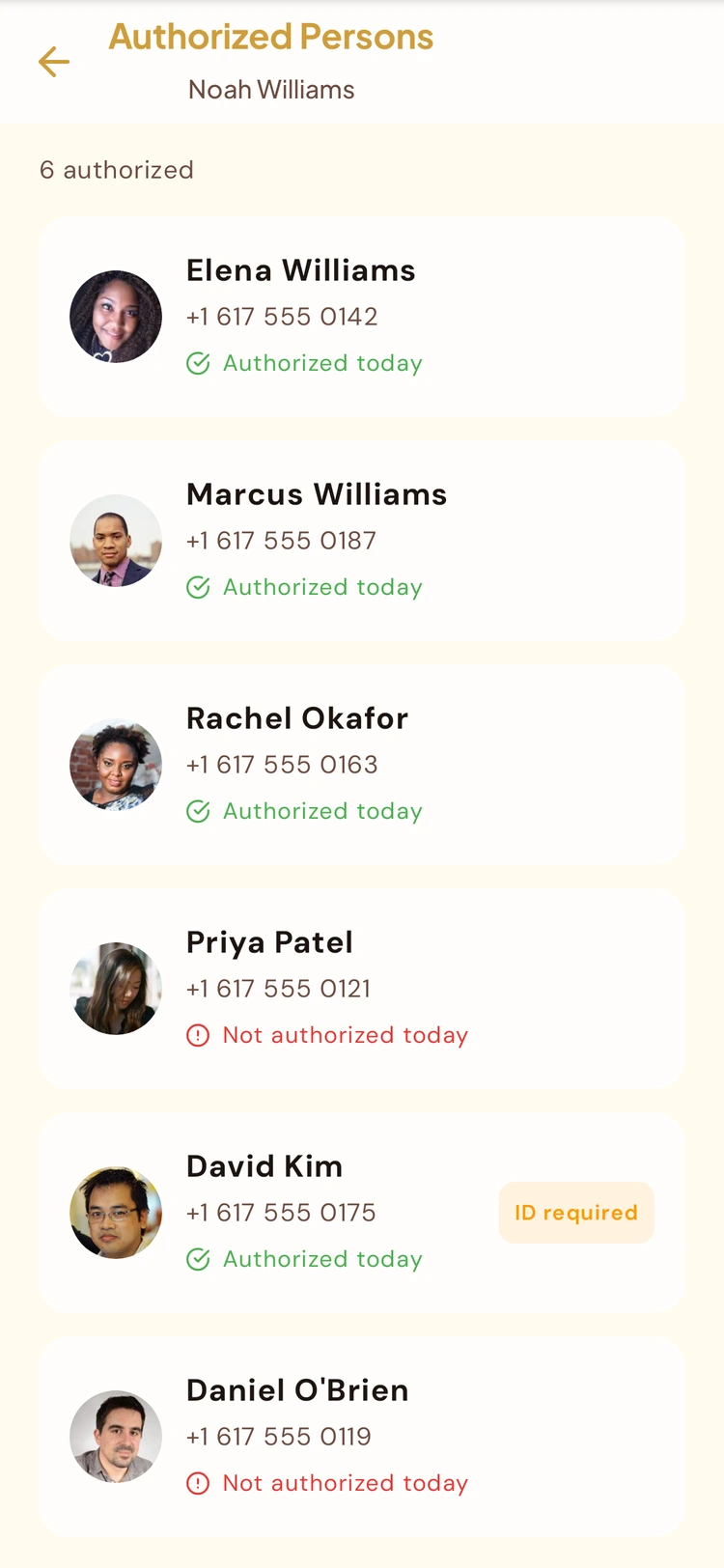
Define who is authorized to pick up each child, with a photo, relationship and optional expiry date. Staff see the list on their device instead of relying on memory or paper forms.
Pickup Verification
At dismissal, staff check the person against the child's authorized pickup list and photo, then record the pickup in the app with a timestamp.
Incident Reporting
Staff log incidents from the mobile app with structured forms, attach photos, and parents can see the report in their app. Every report is kept on the child's record.
Emergency Alerts
Lockdowns, evacuations and urgent health alerts go to staff and parents by push, SMS and email at the same time, even during quiet hours. Parents and staff confirm they are safe, and you see who has confirmed.
Safety Dashboard
See who is present, who has been picked up and which incidents are open. Issue and resolve emergency alerts from the same dashboard.
Emergency Contacts
Store several emergency contacts per child in priority order, alongside medical profiles, allergies and medications, so staff can reach the right person without searching through files.
How It Works
Set up each child's safety profile
Administrators enter emergency contacts and safety notes. Parents add, edit or remove the people authorized to pick up their child, with a photo, directly from the app.
Staff check the list at pickup time
When someone arrives to collect a child, staff open the child's profile in the mobile app, check that the person is on the authorized list, and record the pickup.
Incidents and alerts
If something happens, staff file an incident report or an administrator issues an emergency alert. Alerts go out by push, SMS and email at once, and each action is recorded with a timestamp.
See It in Action
Watch the walkthrough below, or book a live demo to see this feature for your organization.
Safety That Works
Staff compare the person at the door with the photo and name on the child's authorized list before releasing the child.
Push, SMS and email go out at the same time, overriding quiet hours, with safety confirmations tracked per parent and staff member.
Incident reports, pickup records and alerts carry timestamps and stay on the child's record under your retention settings.
Related features
Make Child Safety Non-Negotiable
Give your staff the tools to check pickups, report incidents and alert families, from drop-off to pickup.
Request Demo