Digital Documents, Electronic Signatures and Status Tracking
Send documents to parents and staff to read, acknowledge or sign on their phone, then track every response in one place. Each signature is a simple electronic signature under eIDAS, sealed into the PDF with an audit certificate.
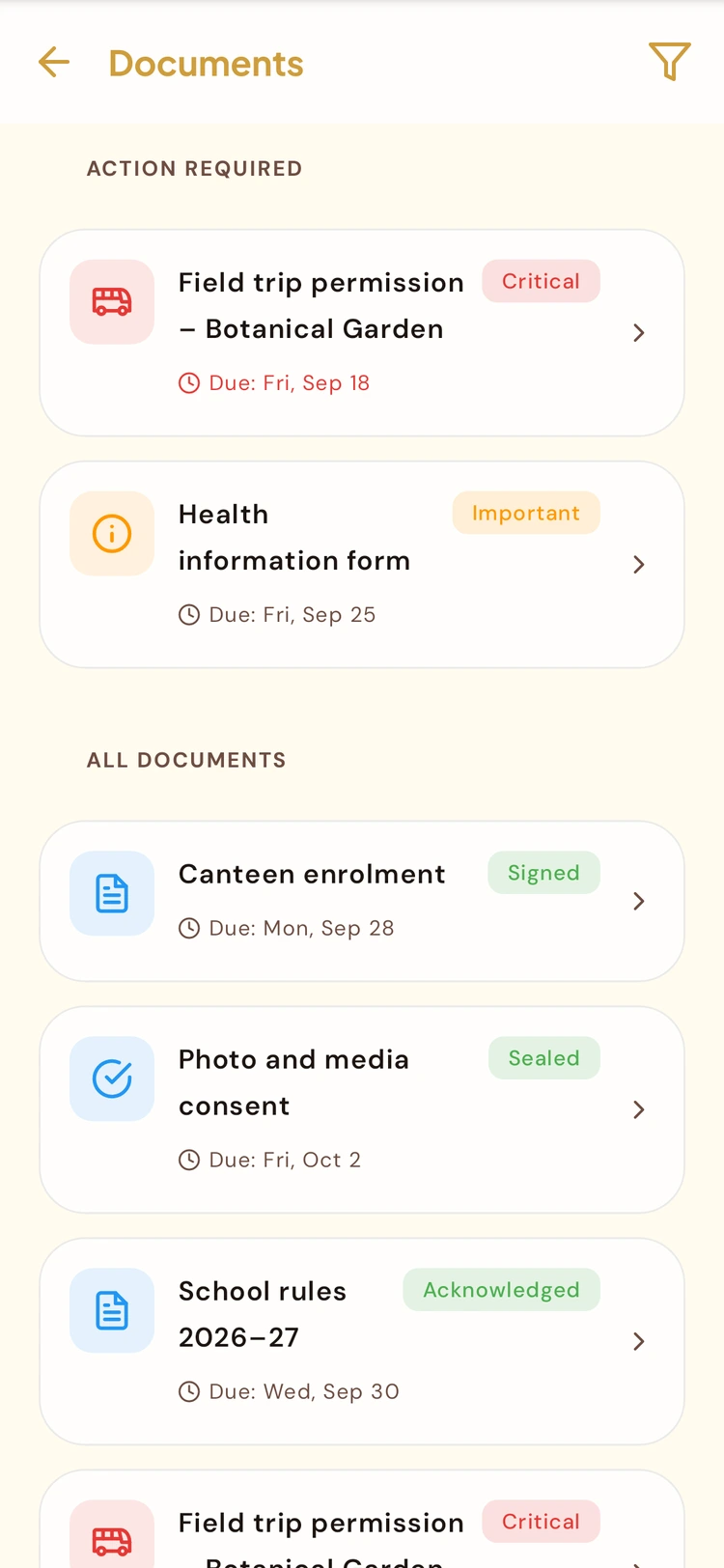
Everything You Need to Manage Forms Digitally
From consent forms to staff contracts, manage your documents digitally.
Document Library
Store your documents in organized folders and file them by student or staff member. Access them from any device, any time.
Digital Consent Forms
Create consent forms for trips, photos, medications and more. Send them to parents in seconds — they read, acknowledge or sign on their phone, with a typed or drawn signature.
Response Tracking
See at a glance who has signed and who hasn't. Automatic reminders go only to members who haven't responded yet, at the interval you set.
Sealed PDF With an Audit Certificate
Each signature is a simple electronic signature (SES) under eIDAS. BeeNet seals it into the PDF and appends an audit certificate with the signer's name, the timestamp, the IP address and the file's SHA-256 hash. Each completed signature is sealed into the PDF with an audit certificate., and the file can't be replaced while a signature is waiting to be sealed.
Organized Folders
File documents by student, staff member or type, and filter the document hub to find the one you need.
Version History
Revising a document keeps its title and audience and increases its version number by one. Every superseded file stays in an append-only version history, with its revision notes.
How It Works
Create or upload your document
Upload your PDF and choose whether recipients just read it, acknowledge it or sign it. For signing, place the signature and other fields on the page.
Send to parents or staff
Select recipients individually or by group. They receive a notification in the BeeNet Connect app with a one-tap signing link.
Track, remind, archive
See who has signed in the document hub. Automatic reminders go to those who haven't. Signed copies are sealed and kept automatically.
See It in Action
Watch the walkthrough below, or book a live demo to see this feature for your organization.
Real Results
Reminders go only to the people who haven't responded, so staff don't chase unsigned forms by hand.
Every sealed PDF carries an audit certificate with the signer's name, timestamp, IP address and the file's SHA-256 hash.
Consent slips and contracts stay in one secure digital library instead of in school bags and desk drawers.
Related features
Move Your Forms Online
Replace paper forms and start collecting electronic signatures.
Request Demo