One Timetable for Staff and Parents
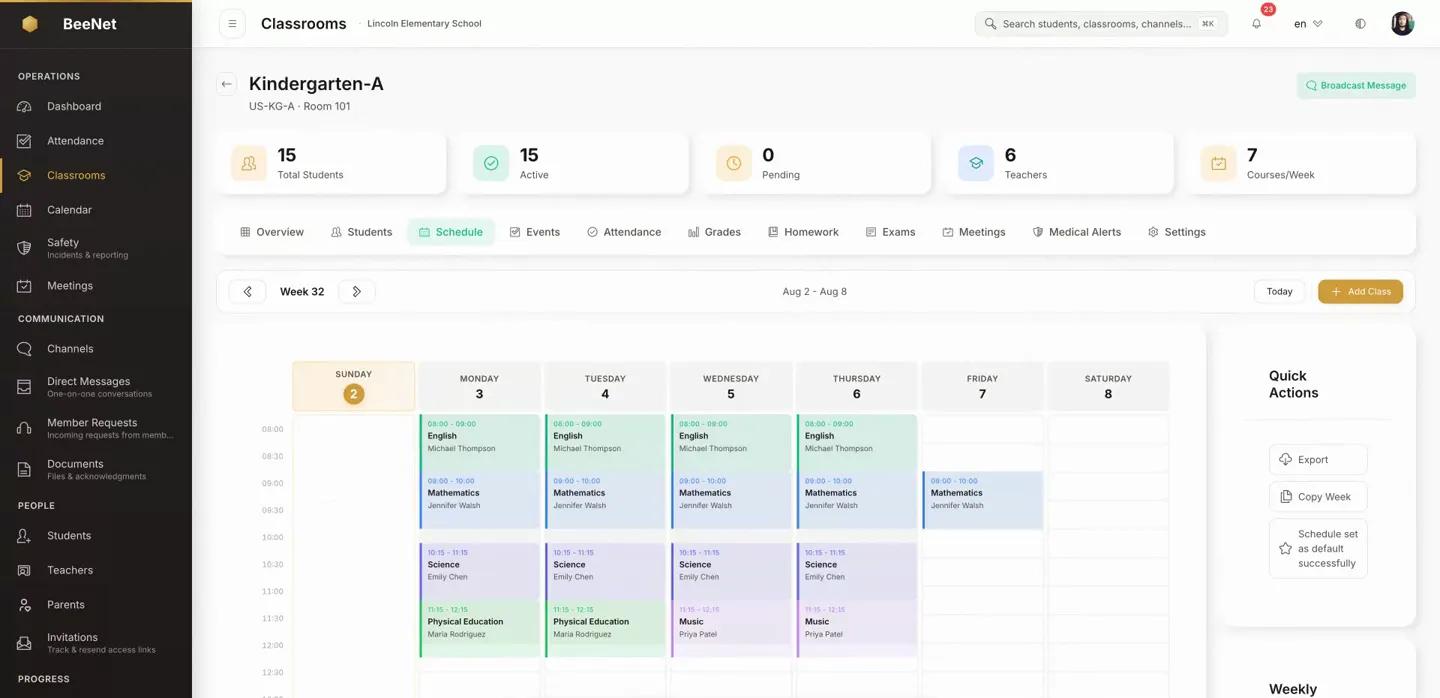
BeeNet's schedule module is the organization-wide view of every class's sessions and exam dates. The parent app displays the session and exam data entered by administrators, so there's no separate parent calendar to re-enter or keep in sync by hand.
What Makes This Different
Four specific mechanisms you can check in a demo.
The Calendar Parents See Is Not a Copy
When an administrator edits a session time or adds an exam date, that is what the parent sees, because both views read the same data.
Exams on the Same Calendar as Classes
Exam dates are entries in the same organization-wide schedule as weekly sessions, searchable in the same way, not a separate list added onto the timetable.
Parents See Their Own Child's Schedule
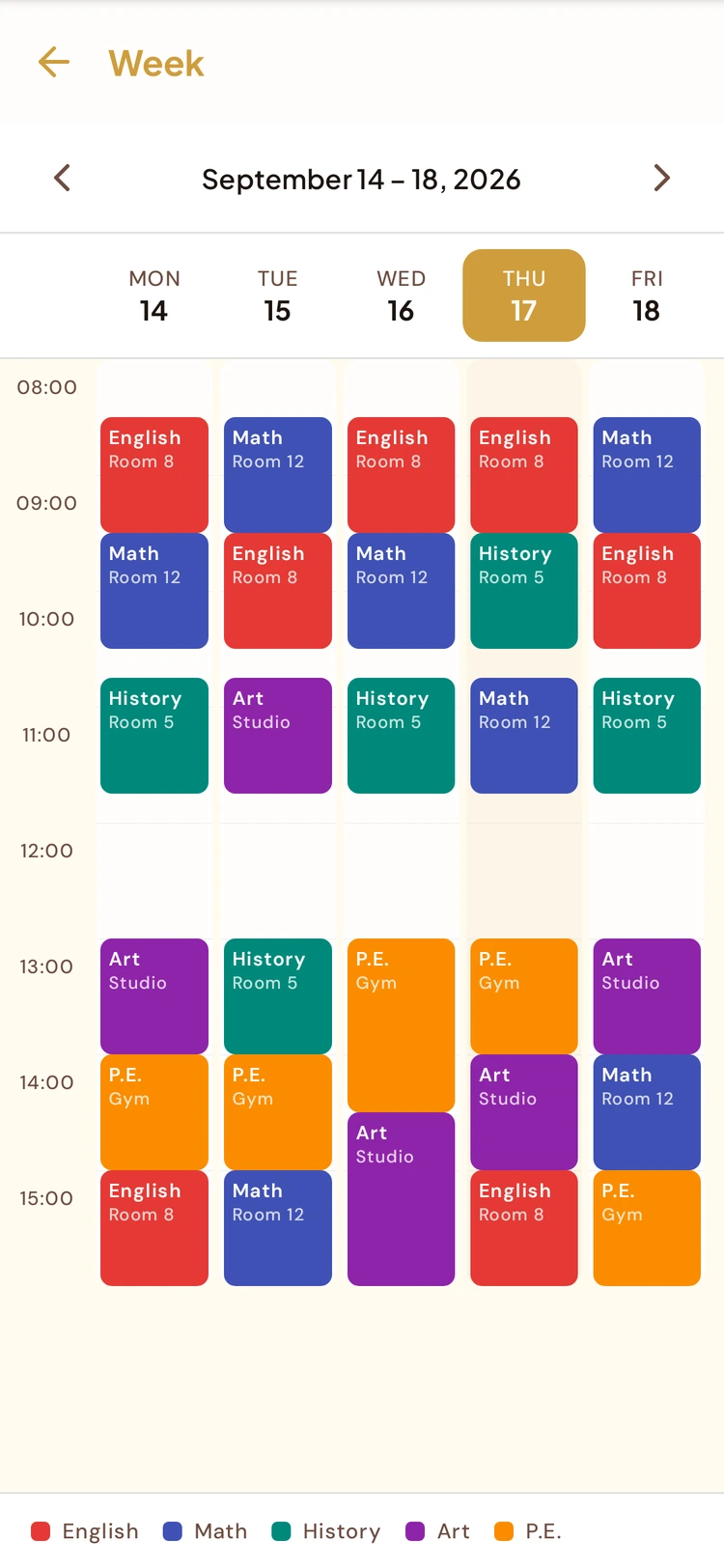
The mobile schedule shows the child linked to the guardian's account, not a general school-wide calendar they would have to filter themselves.
Overlapping Sessions Are Refused
When you save a session, BeeNet rejects it if it overlaps an existing session for the same class or the same instructor, so double bookings don't reach the timetable.
What the Schedule Module Does
The timetable and exam calendar built on your class scheduling data, not a separate system to maintain.
Organization-Wide Weekly Timetable
See every scheduled session across every class in one schedule view, instead of opening classes one by one.
Exam Calendar in the Same System
Exam dates are scheduled and viewed alongside regular sessions in the same calendar, not tracked in a separate spreadsheet.
Individual Dates for Every Session
View individual dates for recurring classes and one-off exams, not just a repeating template.
Schedules on Mobile for Parents and Teachers
Parents see a calendar for their own child. Teachers see their own lessons for today, a chosen date or the week, plus the exams of their classes.
Substitutions Shown on Mobile
When a substitution is recorded for a session, it appears in the mobile timetable. Substitutions are created and approved in the Admin portal.
How It Works
Sessions and exams are scheduled
An administrator creates weekly sessions and exam dates in the class module, and they appear in one organization-wide timetable and calendar.
Staff search the calendar
Look up what is happening by class or date range across the whole organization, exam dates included.
Parents and teachers open their schedule
Parents see their own child's sessions and exams in the mobile app; teachers see their own lessons.
Changes appear without re-entry
An edited session time or a new exam date is what parents see in their app, with no second calendar to update.
Why It Matters for a School
Nobody re-enters a parent calendar or keeps two versions in step.
Look up sessions and exam dates across every class from one schedule view, instead of checking class by class.
Guardians see their own child's timetable and exam dates on mobile, not a school-wide calendar they would need to filter.
Common Questions
Is the parent app's schedule kept in sync automatically, or does someone update it separately?
It updates automatically because it isn't a copy. The mobile schedule shows the same session and exam data administrators enter, so there's no second parent calendar to update by hand.
Can exam dates be scheduled alongside regular class sessions?
Yes. Exam dates use the same organization-wide schedule as weekly sessions, not a separate list or spreadsheet.
Can a teacher check their own teaching schedule from their phone?
Yes. The mobile app shows teachers their lessons for today, a chosen date or the week, and the details of their classes' exams. Administrative staff see every session and exam in the organization from the Admin portal.
Can a substitution be requested from the mobile app?
Not directly. The app shows a recorded substitution when it applies to a scheduled session, but substitutions are created and approved in the class module of the Admin portal. See the classroom management page for that workflow.
Does BeeNet warn an admin if a new session double-books a class or instructor?
Yes, when you save. BeeNet refuses a session that overlaps an existing session for the same class or the same instructor. The form doesn't flag the clash while you are filling it in; the warning appears when you save.
Is this the same as the classroom management module?
They're connected but distinct. Classroom management handles class capacity, teacher assignment and substitution creation. This module is the timetable and exam calendar built on that scheduling data: the weekly grid and exam dates staff and parents look at.
Related features
See the Timetable and Exam Calendar in Real Use
Book a demo to see how staff schedule a class and an exam, and how the dates appear in the parent app.
Request Demo