One Announcement, Everyone in the Selected Group
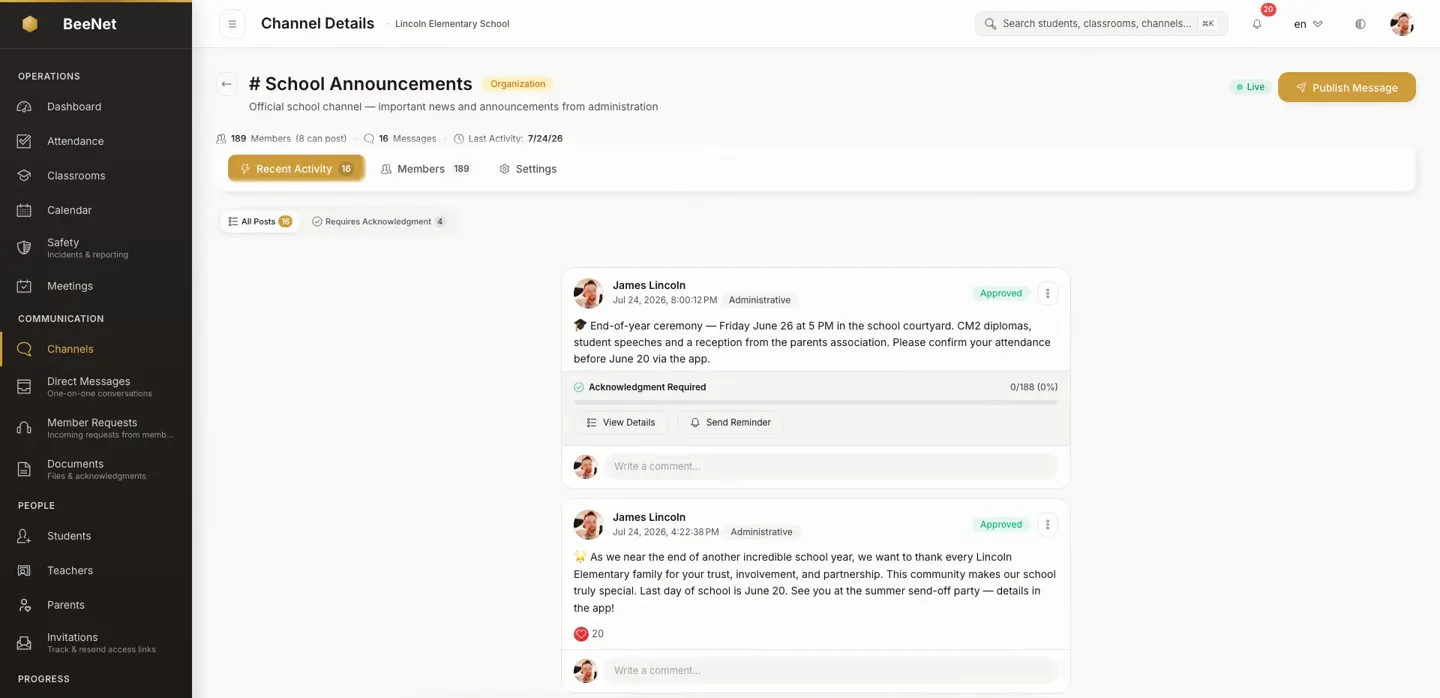
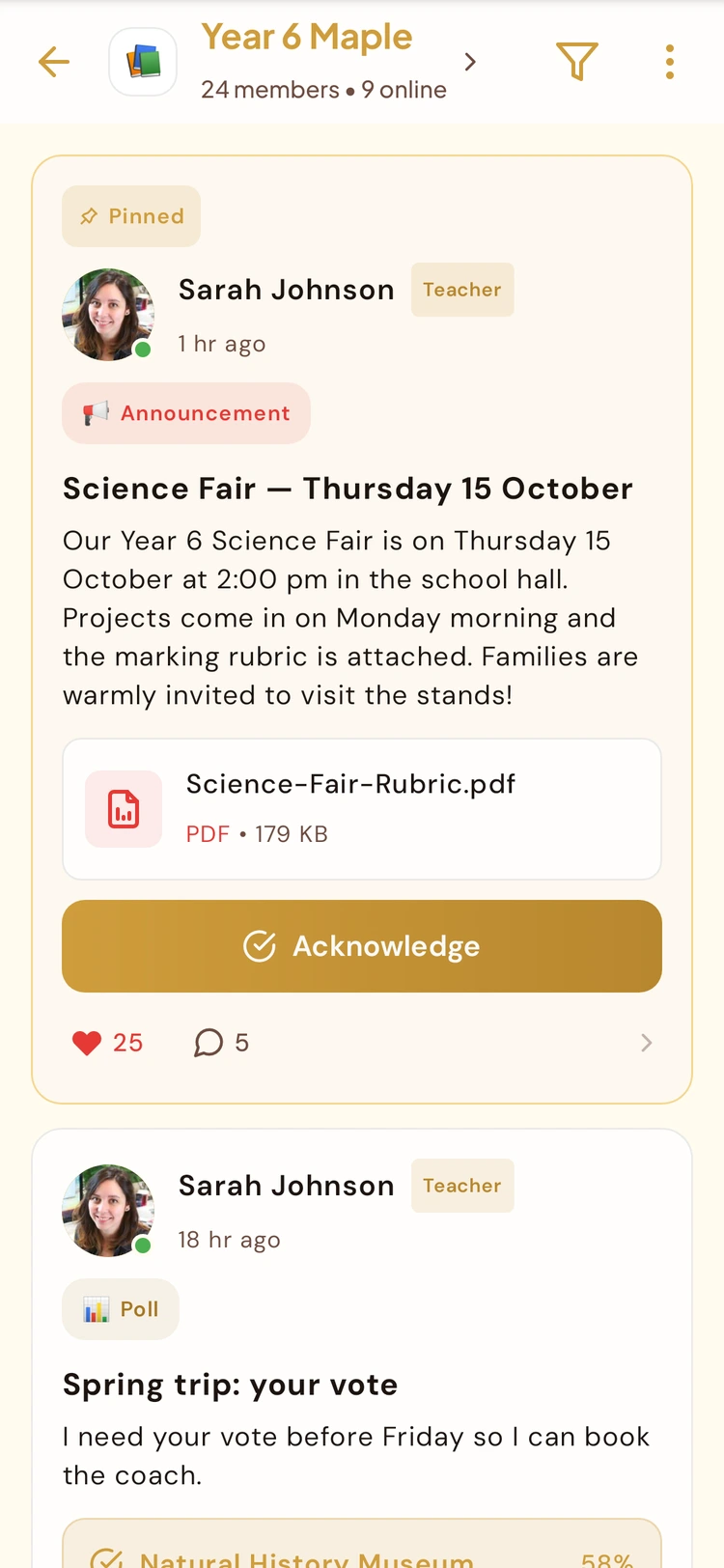
Announcements are a separate one-way broadcast feature, distinct from group conversations and direct messages. Organization admins can post across the organization, while instructors can post to the groups they manage. The announcement appears in the group's channel and home feed for all of its members.
What Makes This Different
A distinct broadcast layer, not a repurposed chat thread.
Not a Group Chat
Announcements are a one-way broadcast, kept separate from the threaded conversations in Channels and from direct 1:1 messages — a schedule change doesn't get buried in a reply thread.
Scoped by Role, Automatically
Instructors can post to the groups they actually run. Org admins can broadcast to the whole organization. Posting rights follow each person's role and group membership.
Every Member Is Included, No List to Build
Everyone who belongs to a group — parent, student, staff — gets that group's announcements in their feed automatically. There's no distribution list to assemble or keep current.
Lives in the Feed Families Already Open
On the BeeNet Connect app, announcements show up directly in the group's channel and home feed — not a separate inbox nobody remembers to check.
What Announcements Deliver
Announcements are part of Channels & Messaging, alongside group channels and direct messages, but remain a separate one-way broadcast feature.
Org-Wide Broadcasts
Org admins can post an announcement that reaches every group in the organization at once — for school-wide notices that aren't specific to one class or team.
Group-Level Broadcasts
Instructors can post announcements to the specific groups they run, so a class or team notice stays scoped to the people it's actually for.
Automatic Audience by Membership
Every role — parent, student, staff — sees the announcements for the groups they belong to, based on their existing membership, without any manual audience setup.
Mobile Feed Integration
Announcements surface directly inside the group channel and home feed on the BeeNet Connect app, next to the conversations families already have open.
Visible From the Admin Dashboard
Announcements appear as part of your dashboard and each group's view in the admin portal, so admins can see what's been broadcast without leaving the tools they already use.
Same Secure Communications Backbone
Announcements run on the same Communications API as messaging and Channels — not a bolted-on side feature.
How It Works
Pick the scope
An org admin chooses to broadcast organization-wide. An instructor posts to one or more of the groups they run.
Post the announcement
The announcement becomes visible to every member of the chosen scope.
Members see it where they already look
On mobile, it appears in the group's channel and home feed. In the admin portal, it shows up as part of the dashboard and group views.
Why It Matters for a School
A schedule change or field-trip reminder goes out once to everyone in the group, instead of being retyped across dozens of 1:1 messages.
Instructors can only post to groups they run; only org admins can reach the entire school — no accidental campus-wide notice from a single classroom.
Parents see announcements inside the same mobile feed as their group's messages — nothing extra to install or a separate inbox to remember.
Common Questions
Is this the same as group Channels or 1:1 messaging?
No. Announcements are a separate one-way broadcast feature — organization-wide or group-level — distinct from the threaded conversations in Channels and from direct 1:1 messages.
Who can send an announcement?
Org admins can broadcast to the entire organization. Instructors can post to the specific groups they run. Every role can view the announcements for the groups they belong to.
Where do announcements actually show up?
On the BeeNet Connect app, announcements appear directly in the group's channel and home feed. In the admin portal, they show up as part of your dashboard and each group's view.
Is there a dedicated screen to manage all past announcements?
On mobile, yes: the Announcements Hub lists drafts, scheduled and sent announcements, with acknowledgment counts and a reminder for families who haven't acknowledged yet (at most once every 24 hours). The admin portal has no equivalent list yet — there, announcements are written and scheduled from the channel composer and appear in your dashboard and group views.
Can an instructor schedule an announcement in advance from mobile?
Yes. On mobile, an instructor can save a draft, schedule an announcement for later across every class it targets, and edit or cancel it while it's still pending. Admins can schedule from the channel composer in the admin portal.
Can announcements be pinned to the top of a group?
Not yet. Announcement pinning isn't available today.
Related features
See Announcements Reach a Real Group
Book a demo and we'll walk through posting an org-wide announcement and a group-level one, and show exactly where each appears for the people who receive it.
Request Demo