Feedback from Families, Routed to the Right Team
Feedback from families often arrives through informal conversations, email and the occasional survey. BeeNet gives parents and staff a structured channel, open all year, that sends feedback about your organization straight to its leadership — kept separate from feedback about the BeeNet platform itself.
What Makes This Different
Four specific mechanisms you can check in a demo.
Organization Feedback Is Kept Separate from Platform Feedback
A concern about how your school or club communicates stays with your organization's leadership. Feedback about BeeNet itself goes through a separate channel, so the two are handled in different places.
Structured Feedback Records
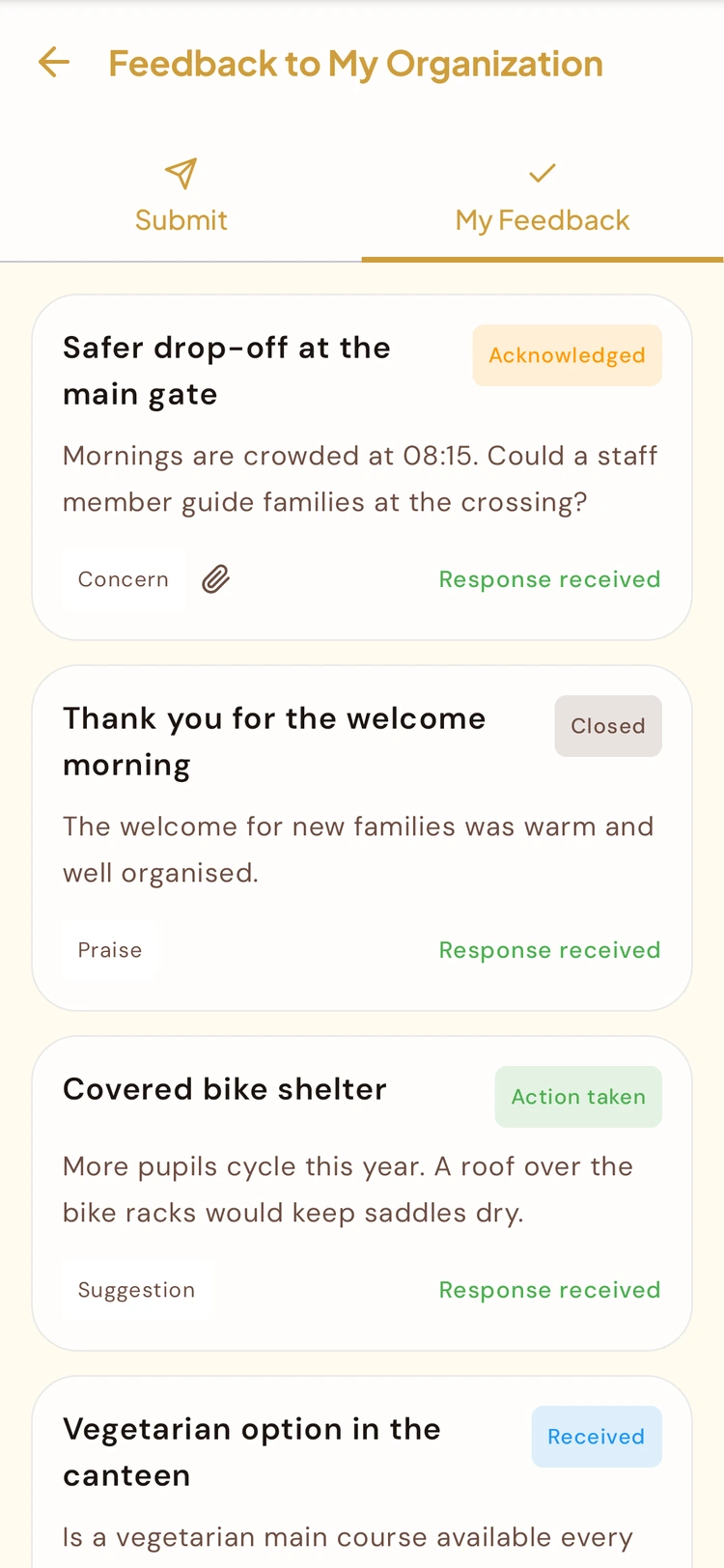
Each submission becomes an entry with a category — suggestion, complaint, praise, question or concern — and a status leadership moves from Received to Acknowledged, Action Taken and Closed, instead of a conversation reconstructed from memory.
Open All Year, Not a Once-a-Term Survey
The channel is available on an ongoing basis, so a family or staff member can raise something the day it happens instead of waiting for the next scheduled survey.
Available From the App Families Already Use
Submission happens through the same BeeNet Connect app parents and staff already use for everything else — nothing extra to install or log into.
What the Organization Feedback Module Does
A direct, structured line from your community to your leadership, reviewed in the admin portal.
Direct Submission From the App
Parents and staff submit feedback about the organization from the BeeNet Connect app they already use, with no separate portal or extra account.
Structured Records
Feedback is captured as a record with a category and a status, rather than scattered across email threads and conversations nobody wrote down. Anonymous submissions can be allowed.
Kept Separate From Platform Feedback
Feedback about your organization and feedback about BeeNet itself go through separate channels and are handled in different places.
Reviewed in the Admin Portal
Your leadership reviews incoming feedback on a board in the admin portal, replies to the person who sent it, and can keep a roadmap of the items it plans to act on.
Open to Parents and Staff Alike
The channel isn't limited to one side of the community — both parents and staff can submit feedback about the organization.
How It Works
A parent or staff member submits feedback
From the BeeNet Connect app, directed at the organization itself — not at BeeNet as a platform.
It's recorded as a structured entry
The submission becomes a structured record with a category and a status, not a freeform email thread to track down later.
Leadership reviews it in the admin portal
Organization admins see incoming feedback in one place, reply to it and update its status — kept separate from platform-level feedback sent to BeeNet.
Why It Matters for a School
Families can raise a concern any time, not just when a survey happens to go out or the right person is caught after drop-off.
Feedback about your organization and feedback about the BeeNet platform go to two different places, so a school's concern doesn't sit in BeeNet's support queue.
Feedback becomes a record with a category and a status instead of a scattered email thread or a conversation nobody wrote down.
Common Questions
Is this the same channel used to report a bug or problem with the BeeNet Connect app itself?
No. Organization feedback is a separate channel from platform-level feedback to BeeNet. A concern about how your school or club communicates stays with your organization's leadership rather than going to BeeNet's team, and vice versa.
Who can submit feedback — just parents, or staff too?
Both. Parents and staff can submit feedback about your organization. Student submissions are off by default, and your organization can switch them on.
Where does leadership see the feedback that comes in?
In the admin portal, on a feedback board where each submission appears as a structured record with its category and status, alongside feedback analytics.
Is the feedback channel only open during a survey period?
No. It's available on an ongoing basis, so a family or staff member can raise something the day it happens instead of waiting for the next scheduled survey.
Do families need a separate account or app to submit feedback?
No. Submission happens through the same BeeNet Connect app parents and staff already use — there's nothing extra to install or sign in to.
Related features
See How Feedback Reaches Your Leadership
Book a demo and we'll walk through the submission flow, where it lands in the admin portal, and how it stays separate from platform feedback to BeeNet.
Request Demo